
Article
How to Set Up Custom Webhook Alerts in TwoPulse
Add an HTTPS webhook in TwoPulse Settings and receive downtime, reminder, and recovery alerts as JSON on Discord, PagerDuty, or any endpoint you control.
Automated heartbeat checks every 5 minutes for your microservices. Keep track of service health with monitoring and beautiful dashboards.
Keep your microservices healthy and monitored with powerful features designed for modern teams.
Ping your services every 5 minutes with automated heartbeat monitoring. Never miss a service outage.
Get notified immediately when response times exceed your thresholds. Set custom latency limits per service.
Ensure correct HTTP response codes. Monitor expected status codes and catch errors before they impact users.
Add services, set thresholds, and we do the rest. Intuitive dashboard with minimal setup required.
Everything you need to monitor and maintain your microservices infrastructure with confidence.
Real-time monitoring
Get instant alerts when your services go down or exceed latency thresholds.
Easy setup
Add your services in minutes with our intuitive dashboard and simple configuration.
Detailed analytics
Track latency trends, response times, and service health over time with comprehensive charts.
Custom thresholds
Set your own latency and status code expectations for each service.
Automated checks
Continuous heartbeat monitoring runs automatically every 5 minutes.
Modern interface
Clean, intuitive dashboard designed for quick status checks and detailed analysis.
Go from zero to full visibility without agents, SDKs, or complex setup.
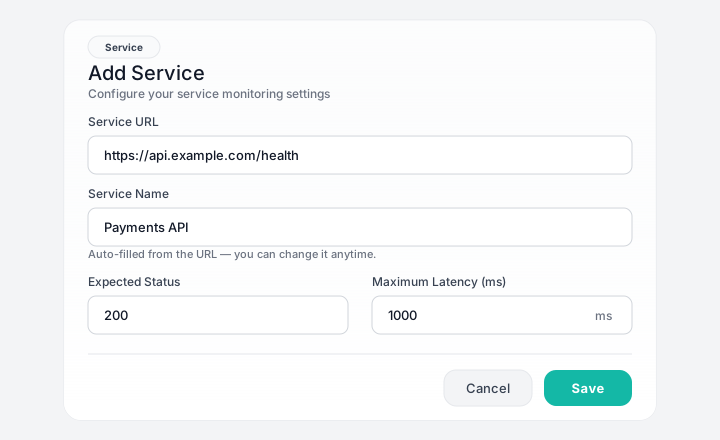
Enter your endpoint URL, expected HTTP status, and latency threshold in the dashboard — no agents, SDKs, or code changes required.
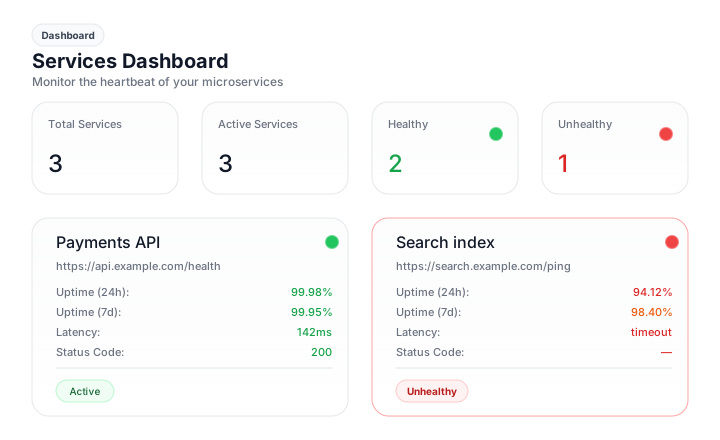
TwoPulse pings your endpoints every 5 minutes and records latency, status codes, and uptime on your dashboard — healthy and unhealthy services at a glance.
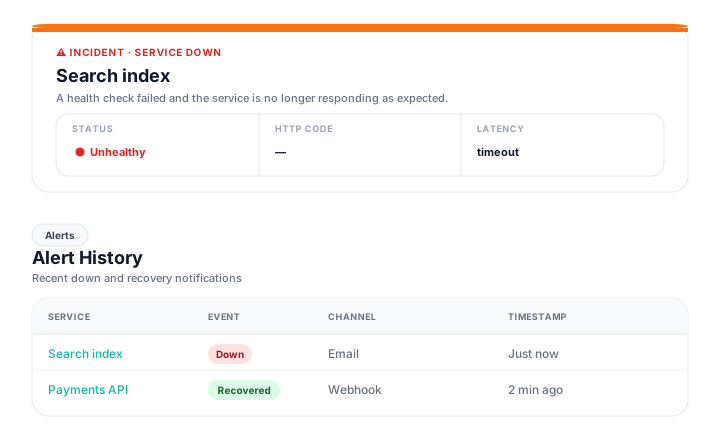
When thresholds are breached, you receive email or webhook alerts with incident details — and every notification is logged in alert history.
Expert insights on microservices monitoring, service health checks, and DevOps best practices.
Article
Add an HTTPS webhook in TwoPulse Settings and receive downtime, reminder, and recovery alerts as JSON on Discord, PagerDuty, or any endpoint you control.
Article
Step-by-step: create a Teams Workflows incoming webhook and add it in TwoPulse Settings so service alerts land in your channel.
Article
Create a Slack Incoming Webhook, paste it into TwoPulse Settings, and get the same downtime and recovery alerts your team already trusts without building a Slack App.
Article
A postmortem that just describes what happened doesn't prevent a repeat. Here's how to structure one that actually changes something.
Choose the plan that fits your team's needs. All plans include our core monitoring features.
Perfect for small teams getting started with service monitoring.
Ideal for growing teams with multiple services to monitor.
Everything you need to know about monitoring your services with TwoPulse.
TwoPulse is a service monitoring platform that runs automated heartbeat checks against your microservices and APIs. It tracks latency, verifies HTTP status codes, and sends alerts the moment a service becomes unhealthy.
TwoPulse continuously runs heartbeat checks on a regular interval, around the clock. Every check records the response latency, the returned status code, and whether it passed your configured thresholds.
You can receive email alerts and webhook notifications (for tools like Slack or Discord) when a service goes down, returns an unexpected status code, or exceeds your latency threshold for several consecutive checks.
No. TwoPulse checks your services from the outside over HTTP, so there is nothing to install. Just add your endpoint URL, set your expected status and latency, and monitoring begins.
Heartbeat history is retained for roughly 13 months, so you can review latency and uptime trends over time and spot recurring issues across your services.
Still have questions? Contact us
Set up monitoring for your services in minutes with TwoPulse.